
Who we are
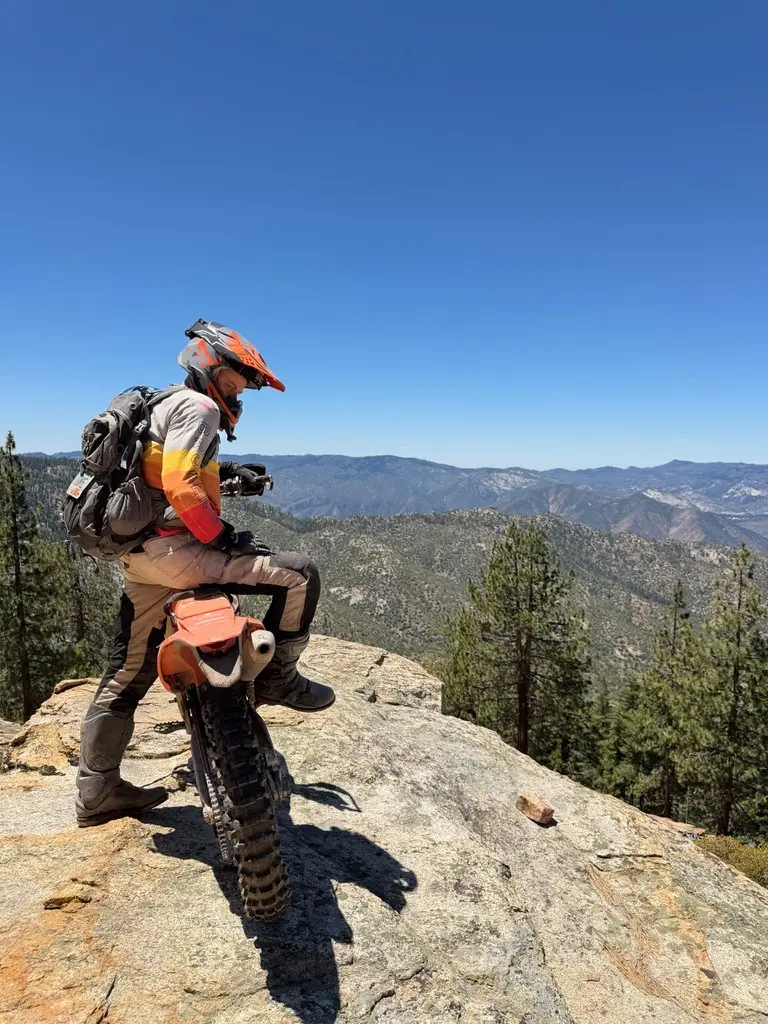
Three co-founders: two who ride hard enduro and have run a business for riders before this one, and a CTO. We test on our own bikes.

On the bike
Decades of riding between us, most of it hard enduro, and a Big Bear Trail Ride finish this year.

In the garage
One of us called the KTM's rpm from the exhaust note before the data confirmed it. Read how.

In the cloud
Years of getting hardware to talk to the cloud, and making sense of the data once it lands.

In business
The WannaBes: over 100 products, sold to thousands of riders. More below.
Why we built it
One random question turned into a quest that ended in 12 pounds of muscle and a Big Bear finish. Read the story.
Big Bear
21st and 22nd at the Big Bear Trail Ride. Two of us have ridden it seven times. The first time we barely made 100 miles and thought it would kill us. In 2026 we finished 21st and 22nd. We are not Olympians. We ride hard.
Where we come from
Before lifelever, two of us ran Extreme Sports WannaBes, “The WannaBes”. For more than five years we made helmet chin mounts for action cameras, built by riders for riders and YouTubers. Along the way:
- Over 100 helmet chin mount models, sold to thousands of riders.
- A podcast, MOBCAST.
- A blog with 166 posts.
- The WannaBes YouTube channel, which had 11.1 thousand subscribers as of October 28, 2026, and is being renamed lifelever.
We wound the mounts down in early 2024. Life Lever Moto is for the riders who used them.
The bikes we test on
| Bike | What we do with it |
|---|---|
| Nov 7, 2026 | Moto’s Live screen now rewinds: touch the chart of your ride so far and a dot shows where you were, with your own tiles at that moment. A saved ride is a clean overview on a real map. |
| 2025 KTM 300 XC-W TBI | Fault codes, live engine data, ride recording, battery watch |
| 2026 KTM 300 XC-W TBI | The same app on a second bike and a second phone |
| 2004 Triumph Sprint ST 955i | An older bike, a different way of talking to it, read through the same app |
The bikes and what each one tells us are written up on the bikes page.
Dated milestones
From our own test logs.
| Date | What happened |
|---|---|
| Nov 14, 2026 | Health lists every sensor under the device that records it, Apple Watch or iPhone, and you pick which devices each activity uses, the phone alone if you like. |
| Nov 13, 2026 | Everything Apple Health holds. Life Lever Health can bring in any kind of Apple Health data you allow, from toothbrushing to blood glucose, chosen once in Apple’s own screen, and a kind your record has never seen gets its own place the first time it arrives. |
| Nov 13, 2026 | Connections became tiles. Every source and every AI assistant you can connect, down to the Apple Watch, has its own tile and its own page, and anything that stops says so right on its tile. |
| Nov 12, 2026 | Workouts became activities. Health keeps one list for anything you track, from a run or a stretch to a meditation or a feed. |
| Nov 12, 2026 | Each workout in Health picks how it ends on the watch: a plain tap for yoga, a held press for most, or Apple’s own Water Lock for hockey and dirt bikes. |
| Nov 11, 2026 | Health got its own heart. The app now wears the same forest, cream and oak as the rest of lifelever, with a mark of its own: the tree rings, with a heart at the center. |
| Nov 11, 2026 | A glove can’t end the game. On the Apple Watch, End is now a two-second still press, you have 30 seconds after End to keep going with nothing lost, and an activity like hockey can lock the watch screen while it records. |
| Nov 10, 2026 | One next step. Your account’s Home now starts with a single card for where you are in getting started, from connecting your assistant to your first goal, and it steps aside once you are set up. |
| Nov 9, 2026 | Life Lever Fitness is now Life Lever Health: the same Apple Watch and iPhone app and the same account, under a new name. Its pages now live under Health, and the old Fitness addresses still lead there. |
| Nov 9, 2026 | Room for the map. Both apps now keep warnings and notes in a bell with a count, and only a problem that stops the app gets a line on screen. |
| Nov 9, 2026 | Charts in your colors again. A chart your assistant draws for your dashboard shows its colors in light and dark, and a line chart can carry several lines at once, such as carbs, protein and fat a day, each in its own color with a key. |
| Nov 9, 2026 | A warning you can open. The motorcycle app’s warnings now open in full, in plain words, with what to check first and a way to ask your own AI, and your rides, routes and engine data sit together in one Library. |
| Nov 9, 2026 | Research is back as its own tab, for the questions you are still working out with your assistant, from labeling a trail to planning a trip: what is known so far, the history, and links to the pages and documents that go with it. Ask your assistant to pick a project up, and it carries on where the last conversation stopped. |
| Nov 9, 2026 | A gentler start. Your assistant now begins from what you came for, asks one thing at a time, and leaves you with one small next step. In your first days it can set up a starter card, a first activity or a first ride view for you, says when it does, and takes any away when you ask. A baby and family, food and the house join the places to start from. |
| Nov 9, 2026 | Sitting time, from your watch. Life Lever Health now brings in your heart rate and stand time from Apple Health, so lifelever can count the hours you spent sitting each day. Press Allow the new Health data once in the app. |
| Nov 8, 2026 | Bring your own AI assistant: lifelever works with the major assistants, as long as yours lets you add a custom connector, and the connect page now gives the general steps for any of them. |
| Nov 8, 2026 | A new look for the website: cream pages, forest green and oak from the tree rings in our mark, and the name written the way we say it, lifelever, one word. |
| Nov 7, 2026 | Your day, the way you went. Choose how often your phone notes where you are, from every second to once a day, and see the real route between your stops and how long you stayed at each. When you stay put, the GPS rests. |
| Nov 7, 2026 | Tidy up your own dashboards. Every tile has a menu in its corner, and a tile you are done with comes off in two clicks, with no need to ask your AI assistant. |
| Nov 7, 2026 | Any chart you can describe. Your AI assistant can now draw your data on a tile in whatever way makes sense to you, sealed off so it can only ever show your numbers, never touch them. |
| Nov 7, 2026 | Charts on Insights got a proper redraw. They fill their tile at any size, with gridlines that follow your numbers and as many dates as fit. |
| Nov 7, 2026 | Your AI assistant now knows everything an insight can show. Say what you want to see, or that you don’t like how a tile looks, and it tells you what it can change. |
| Nov 6, 2026 | Goals became a map. You sit at the center and each goal circles you: bigger when more goes in, closer when it is really working, with a faint ring for how much you said it matters. Your own AI assistant works out with you what success means, then checks what you log against it. |
| Nov 6, 2026 | Dashboards on Insights fit your screen, and you can drag and resize each tile until it shows what you care about most. |
| Nov 6, 2026 | Insights arrives in your account: ask your AI assistant a question about your data once, keep the answer, and it stays on a dashboard of your own, up to date every time you look. |
| Nov 6, 2026 | A new privacy policy in plain words. lifelever accounts are for adults, and you can delete your account yourself, with your record and every backup copy. |
| Nov 5, 2026 | Each product page and the waitlist now say, in one place, what you need and what happens after you join: Moto, Fitness and Home, with what is required and what is optional. Each blog article ends with the next step for its product. |
| Nov 4, 2026 | Life Lever Moto learns bikes from the people who ride them. Plug in, run the bike for five minutes or just go for a ride, and tap send: the next rider of that model gets live readings. Only what the bike computer says goes up, never where you rode or who you are. |
| Nov 4, 2026 | lifelever is officially a company. The paperwork came through today, the least fun lever we have pulled so far. |
| Nov 4, 2026 | Life Lever Fitness grows up: one Start button, a live workout screen with your clock and heart rate on phone and watch alike, the same on your lock screen, and Pause and End that take a deliberate press, so a sleeve cannot stop your workout. No watch? Your phone records the route, distance and steps on its own. Promises you have made, like yoga every night, get a quiet tick when you keep them. |
| Nov 4, 2026 | Your assistant no longer asks for a debrief after every workout. When you dig into a ride or a session with it, it offers once to note what you made of it against a goal of yours, and brings that back when a similar one comes up. |
| Nov 3, 2026 | Your assistant now knows what lifelever is for and reads a short guide before each kind of job, instead of one long list it could not finish. Tell it a rule once, such as always estimate the salt too, and every assistant follows it: you see, edit and remove your rules under Profile. A meal you describe without numbers is estimated, marked as an estimate, with what it assumed. |
| Nov 3, 2026 | In the Moto app, press and hold a tile on the map and drag it anywhere, like icons on your home screen, with Back to the sides to start over. A short tour shows a new rider the basics on the real screens, and Settings plays it again whenever you want. |
| Nov 3, 2026 | Your account has a Tracks page. Every route you have recorded, a ride, a workout with GPS or an imported file, opens on a map coloured by speed, with its numbers, kilometre splits and stops. Add a GPX file and it is drawn whole, every track, route and waypoint with its notes, and it reaches your Moto app on its own. It only shows in your menu when you have something to see. |
| Nov 2, 2026 | This site starts with what brought you: a workout, an off-road trail map, a race route, the warning light on your bike, counting calories or the house, each worked start to finish. Moto has its own pages for riders and a side-by-side with other apps. One plan, $5.99 a month, includes every app, free during the private beta, and your own AI is optional. The waitlist can carry what brought you. |
| Nov 2, 2026 | The Connections page shows what needs you first, one row for each assistant or app however many times it signed in, and a closed list for ones you have not used lately. A new key gets its own screen with the key, the setup steps and a Copy button. |
| Nov 1, 2026 | Plain-language Terms of Service explain your rights and responsibilities, with agreement at account setup and sign-in when the terms change. The privacy policy explains app activity, crash reports and the switch that turns sharing off. |
| Nov 1, 2026 | The Moto app opens straight to the map, ready to record. Both apps now check that they open cleanly before every test version goes out, and if one part of an app ever has trouble starting, the app still opens and pauses only that part. |
| Nov 1, 2026 | Your sleep, resting heart rate, heart rate variability, weight, steps, breathing rate, blood oxygen and other apps’ workouts come into your record from Apple Health through the Life Lever Fitness or Moto app, with no extra app to buy, and the same night arriving more than one way is kept once. |
| Nov 1, 2026 | Start a workout on your watch from your phone with one tap, and your watch sends each workout straight to your record over Wi-Fi or cellular, without waiting for your phone. |
| Nov 1, 2026 | Your own AI assistant gets you started: it asks what brought you, offers one thing to try that fits, knows everything lifelever can do and what you have connected, and suggests a new idea now and then, only when it fits and only until you say stop. |
| Nov 1, 2026 | A Start here guide connects your own AI assistant in a few minutes: pick yours, copy each piece with one tap, and the page shows when it has connected and last used your record. Setting up a sign-in code on a phone is one tap to copy too. |
| Oct 31, 2026 | Tell your own AI assistant something you logged was wrong and it fixes it: it edits the entry or takes it out, and your history keeps the old version with your reason. |
| Oct 31, 2026 | Name the spots you come back to on the trail. Drop a pin with one tap while riding, or press and hold the map, and name it later, on the map, in the ride, or by telling your own AI assistant. Names show on both maps with no signal, on every phone on your account, and each ride keeps which places it passed and which hill climb attempts were at them. |
| Oct 31, 2026 | Name a view of your ride map once, in chat with your own AI assistant or on your phone, and every phone on your account has it. A hill climb view can count each climb on its own, from the phone’s barometer, and keeps every attempt in the ride. |
| Oct 31, 2026 | Life Lever Fitness announced: an Apple Watch app, with a small iPhone app beside it, to record hockey, running, swimming or the gym on your wrist with no phone, for people who have no bike and no smart home. It has its own page. (Fitness is now in the private beta.) |
| Oct 30, 2026 | Report a problem or suggest an idea from your account page or by asking your own AI assistant, and see each one move from received to being built to shipped. |
| Oct 30, 2026 | Pick an activity on your watch, such as hockey, and record it with your phone left at home; it reaches your record once the watch is back near your phone. (Since Nov 1 the watch sends it straight to your record.) |
| Oct 30, 2026 | Your watch’s activities and the sensors each one records can now be set from your account page or by asking your own AI assistant, ready for recording on the watch with no phone. |
| Oct 30, 2026 | The site says it plainly: lifelever works through the AI you already use, and there is no lifelever chat, by design. |
| Oct 30, 2026 | Your account pages open faster: Home, Feed and Docs each ask for what they show instead of looking through everything, and a page you just looked at opens at once until something new arrives. |
| Oct 29, 2026 | The first articles on what the Moto app does: following an event route as you ride, the trails you have ridden on your map, and a dash you arrange. The Moto page now lists what the app does. |
| Oct 29, 2026 | Home shows what stands out instead of weekly totals: your goals with the numbers that move them, what has left your normal, links between things with enough days behind them, new bests, and what your AI found. Your AI can change what it watches when you ask. |
| Oct 29, 2026 | Your account becomes a place to look at your own record: your week, goals, plans, the research your AI saves for you, what feeds it, and every entry day by day. |
| Oct 29, 2026 | The site gets a space for each lever: one for Moto, one for Home, each with its own feel, and the way back to all levers one tap from any page. |
| Oct 29, 2026 | The waitlist opens: join from this site, and a welcome email from us arrives in your inbox. |
| Oct 28, 2026 | Life Lever LLC filed, and this website live. |
| Oct 26, 2026 | lifelever in the cloud, with sign-in from the app. |
| Oct 25, 2026 | First ride with Life Lever Moto: two of us, two KTMs, two phones, two and a half hours each. |
| Oct 19, 2026 | First session with the Bluetooth data connector on both the Triumph and the KTM. |
| Oct 12, 2026 | lifelever’s core goes live: one record per person, every fact with its source. |
| Sep 20, 2026 | Work on Moto starts, and first contact with the Triumph’s engine computer. |
| July 2026 | The idea written down: one record of a person, read by the AI they already have. |
| June 2026 | The breakfast debrief after the ride, where the frustration with our tools turned into the idea. |
| June 2026 | Finished the Big Bear Trail Ride, 21st and 22nd, on the seventh try. |
We write a dated log entry after every session that touches something real: a bike, a phone, a live service.
How we work
- We ride on it. We are our own first test riders.
- We say it in plain words.
- Your record is yours. We charge for what we add and never for access to your own data.
- There is no AI of ours inside the product, and no chat of ours to talk to. You already have an assistant; lifelever widens what it can do.
Say hello
[email protected], or see contact. If you ride a bike we have not tested, we would like to hear about it.