
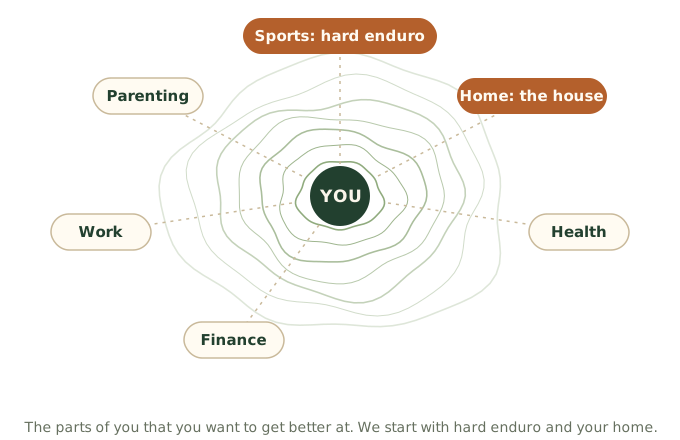
Your AI assistant knows the world. It knows you only as far as it can see. lifelever is the part that lets it see you, in one place, over years.
Around you are the parts of your life you might want to work on: sports, your home, health, finance, work, parenting. We are starting with hard enduro and your home, because those are what we know. Your rides, workouts, sleep, food and receipts feed them, so you can ask questions that cross all of them.
Why there is no lifelever chat
By design. People do not want another screen or another chat. They already run parts of their life with an AI assistant, and they already have one they pay for and trust. So lifelever does not ask you to move: it sits behind the assistant you have and widens what it can do.

It remembers
Your assistant starts from your rides, sleep and goals instead of a blank page, every time.

It holds your data
One record that is yours, with every fact keeping its source.

It acts
What you decide is carried out on the bike and in the house.
You talk to your own assistant, as you do now, and lifelever gives it your life to work from. Your account at app.lifelever.ai is where what your assistant made for you is kept and shown: your goals, the research it saves, what it found and the panels it builds, and every entry day by day. It is a place to look, not a place to talk.
Bring your own AI assistant. The major assistants work, as long as yours lets you add a custom connector. See the details.
Three parts, one you
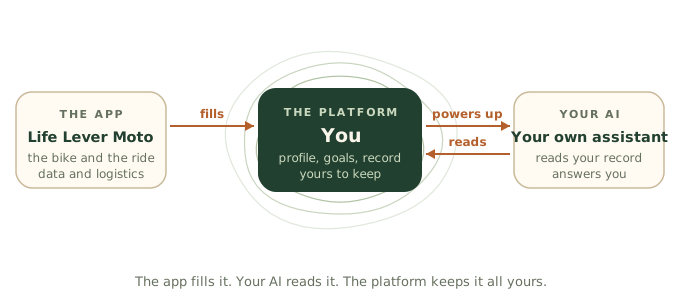

The platform
Your lifelever account, in the cloud. It holds your profile, your goals, your record and your bikes, and shows who and what is connected. You can take your data out from there.

The app
Life Lever Moto on your iPhone. It reads the bike, records the ride and sends both to your record. See Moto.

Your AI
The assistant you already use. It is where you talk. It reads your record through a connector and answers from it, on the plan you already pay for. Connect your AI.
Life Lever Home works the same way, with Home Assistant as the data connector to your house.
The app fills the platform, your AI reads the platform, and the platform keeps it all yours. lifelever is the memory, not the brain: no AI of ours reads your record, and there is no chat of ours to talk to about it.
Each lever has a space of its own on this site: Moto for the bike and the ride, Home for the house, Health for your watch and your workouts. They are separate spaces on one record. The way back to all levers is one tap away from any page.
Acting on what you decide
Data informs a choice, and a choice needs somewhere to act. lifelever acts on what you decide, not only records it. You decide in a conversation with your own assistant, or in your account. The house or the bike carries it out: Home Assistant still runs the house and keeps its safety rules, and the Moto app still runs the bike.
What you decide travels as a profile: made in one place, carried out in another. It arrives in seconds when it needs to, takes effect on schedule, runs out and falls back safely, and the house and the bike keep working on the last profile they got when there is no signal.
Read more about profiles.
Your assistant can reach everything you own by default. Comfort changes just happen and can be undone. Anything that costs money shows its before and after. Safety is never switched off. When it cannot do something, it says what it can do instead and how to get the rest. See what your assistant can reach.
Your profile does the setup
You and your goal are the focus, not managing the app. Your profile carries the setup, so you say it once.
Your platform profile
Your name, your sign-in, your bikes and your goals live in your account and your record. Sign in on a new phone and your bikes and settings come back.

Your bike profiles
Pick your bike and the app knows how to talk to it, which live values it has and, on the KTM 300 XC-W, its service schedule from the manual. See the app.

Your goals
Goals are facts in your record, so your AI weighs every answer against them. Goals and reminders reach the app on the bike as a profile.
What goes in
Everything in your record has the same shape: what it was, when it happened, the numbers, and where it came from. That shared shape lets one question reach across all of it. This is what comes in, and how.

Rides and workouts
From Life Lever Moto, or from GPX files you give your AI: distance, climb, top speed, lean, engine hours.
Bikes and vehicles
Fault codes, battery readings, service and fuel, from Life Lever Moto and from what you tell your AI.

Health and body
Sleep, weight, heart rate and steps from an Apple Health export you give your AI. It can also be sent automatically from your phone.

Food
Meals and what you told your AI you ate.

Money
Receipts, trip expenses and fill-ups, from a CSV or from what you tell your AI. An app can feed it on its own.

Weather
What the ride or workout was in, joined to it.
Goals
What you are working toward, and how it is going.
Notes
A debrief after a ride, in your words.
To bring a file in, your AI gives you a short-lived upload link. A lever is an app that feeds your record on its own; Moto is the first, Home is the second, Health on your watch is the third, and a car or a gym app can plug in the same way. If you start tracking something we never thought of, your AI can add the type.
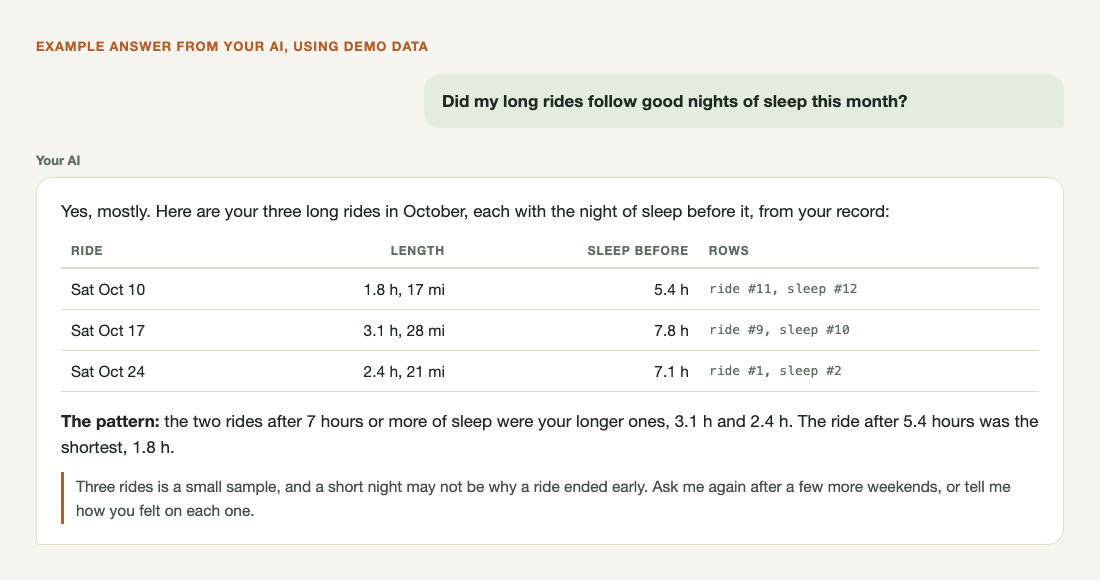
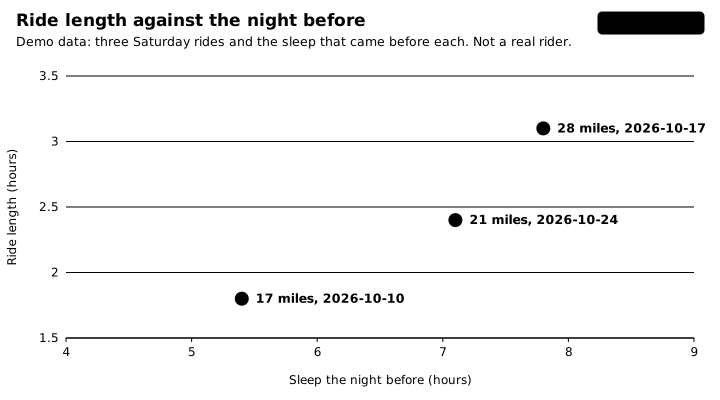
Demo data, not a real rider: three rides and the sleep before each. With your own record, your AI draws this from months of your rides, not three.
Corrections keep their history
Corrections keep their history: a wrong fact is corrected or retracted with a reason, never quietly erased. If a fact is wrong, your AI records the correction and the old one is marked as replaced. If it should not count at all, it is retracted, with a reason.
The history stays, so an answer can always point at the rows it came from, and a mistake never silently rewrites your past. Neither your AI nor an app can delete from your record. Removing your personal information or closing your account is a separate request to us: how to ask.
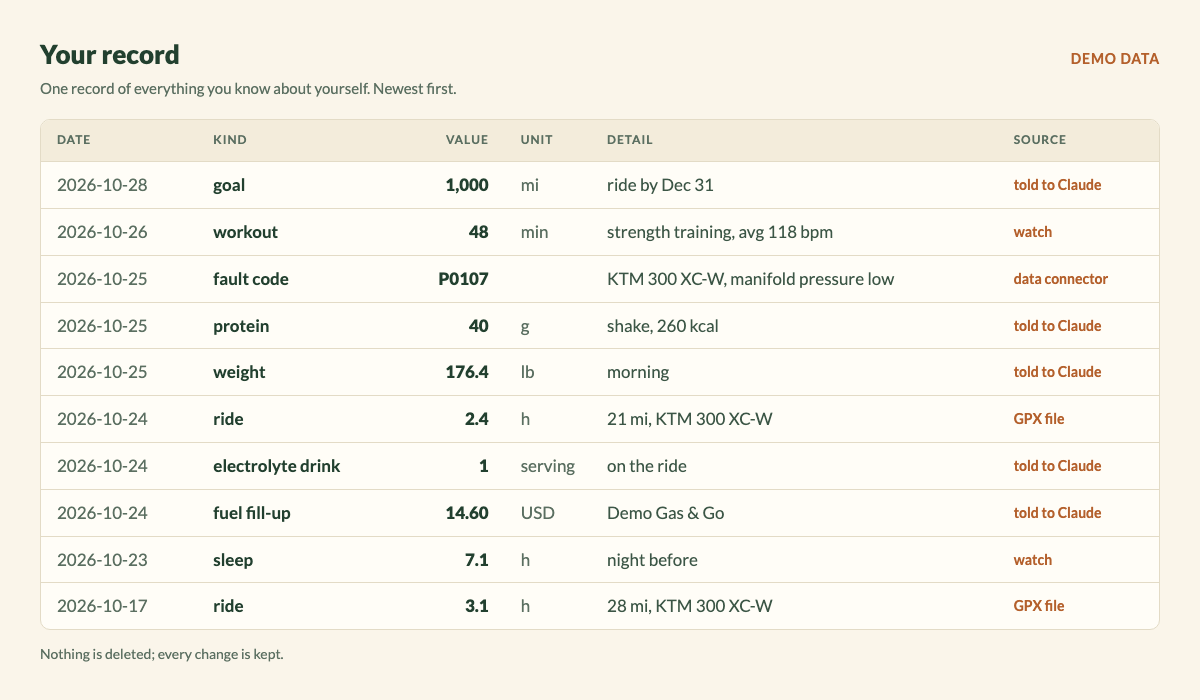
Every fact keeps its source
Each fact records where it came from: the file it was read from, the app, or “you told your AI”. The raw files you bring in are kept as they arrived. Ask “where did that number come from?” and there is an answer.
Where it lives
lifelever lives in the cloud, at app.lifelever.ai. Your AI connects to it from anywhere, including your phone, and apps send to it on their own.
Take it all with you
Download your record from your account at any time, as a database file you can open with other tools, or leave with. Your assistant can fetch each original file you uploaded.

