
Set up by your profile, not by you
Moto is the app part of lifelever: the bike and the ride. Your profile does the setup, so you can just ride.
- Sign in. Your lifelever profile and bikes come with you, including onto a new phone.
- Pick your bike. The app knows how to talk to it and what it can show.
- Ride. Record, then ask your AI what the ride said. Setup is done.

How to talk to your bike
Your bike's profile sets the protocol and the live values it reports. We have verified the KTM 300 XC-W and the Triumph Sprint ST 955i. Another bike starts on the standard diagnostic channel and says what it confirmed.

Tiles that fit the bike
The Live screen shows the values your bike has, in its own words, and you arrange the map's tiles to suit you.

A service schedule from the manual
The KTM 300 XC-W starts with the intervals from its repair manual, counted from your own engine hours, miles and months. The Triumph lists its items and you add the intervals. You can edit either list.

A new phone, the same you
Sign in and your bikes, your settings and your last 30 days of rides come back.

Your goals on the bike
Your goals already live in your record, where your AI reads them. Goals and reminders reach the app as a profile.
The app collects and sends. Your own AI does the analysis.
Where it is today
Moto is an iPhone app. It is not in the App Store, so we hand it out by invite.
Apple Watch
The watch adds heart rate to a ride.
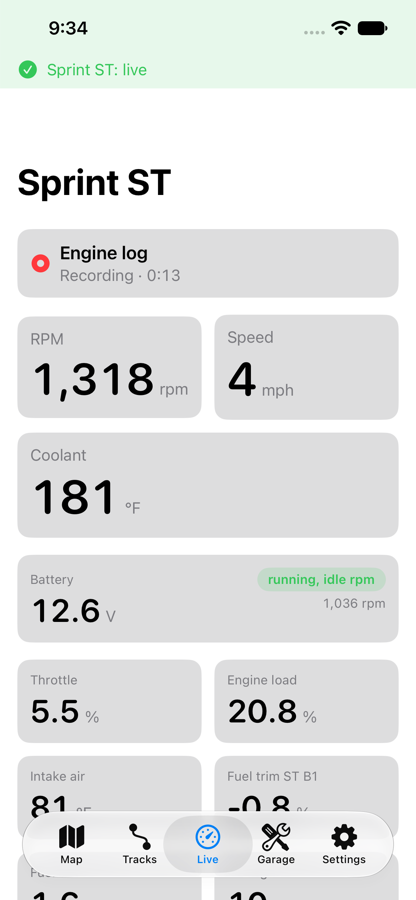
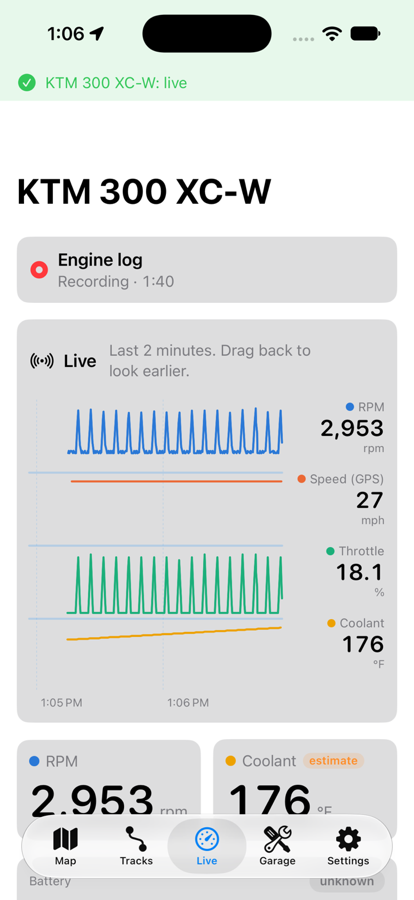
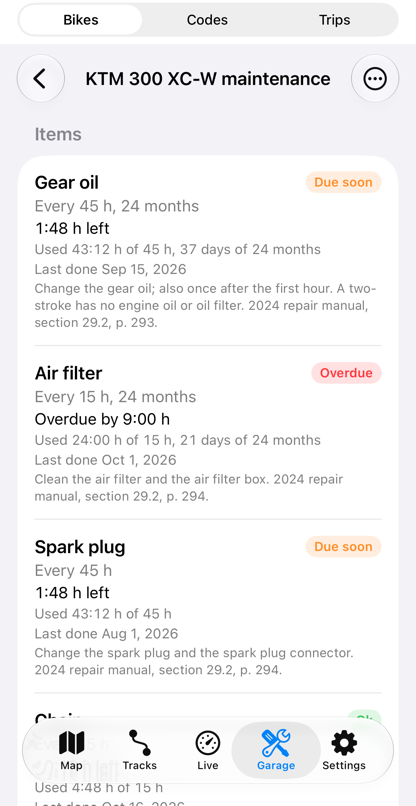
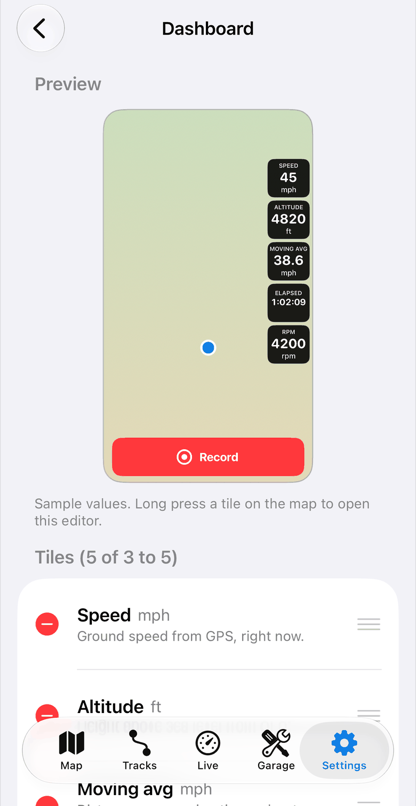
What each screen does
Live
Tiles show what the bike reports right now. A graph plots rpm, speed, throttle and coolant for the last two minutes, and you drag back to see earlier. Values depend on the bike. See the bikes.

Codes
The fault codes your bike has stored, in plain words. The app reads them in the background, every ten minutes when the bike is quiet, so live data always comes first. It can clear them only on a bike whose profile allows it, today the Triumph Sprint ST 955i, and only after you confirm each time.

Record a ride
Record, Pause, Resume, End, Save, with buttons big enough for gloves. Only you start and end a ride: the data connector connects by itself to read the bike, but nothing is recorded until you press Record. A ride is the GPS track plus the engine data of each bike connected. If the app is killed mid-ride it loses seconds, not the ride.

The map
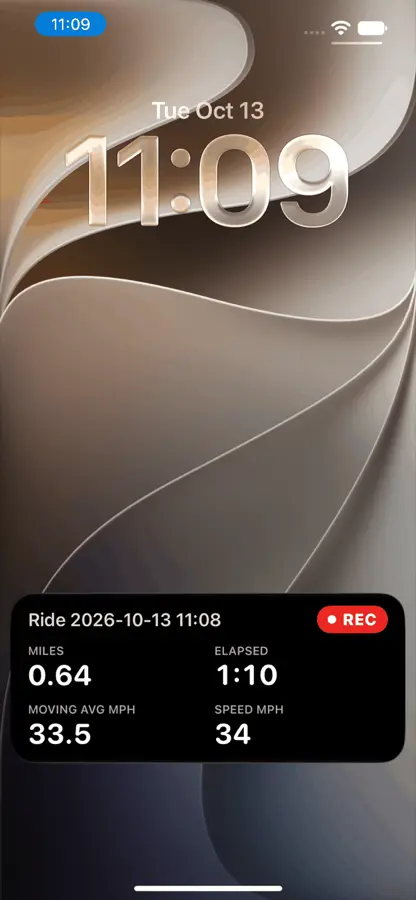
The home screen is a map with two modes, switched by a button. Speed, distance, climb, heading, lean, rpm, coolant and battery voltage sit in tiles beside it. A lock-screen display shows the basics while you record.
Ride list
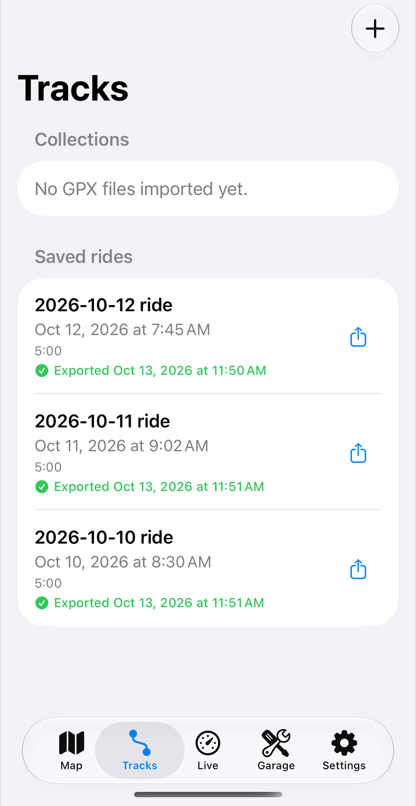
Every saved ride, with its map, its stats and a section for lean and g. Rides export as GPX. See GPX.

Battery watch
Reads the voltage at the bike's port and flags readings that look wrong, from rules about voltage.

Sign in
Moto works through your lifelever account: signed out, it shows only the sign-in screen. Signed in, it works with or without a connection, and each saved ride, your bikes and your GPX files go up in the background to your own record when there is signal. A new phone brings back your settings, your bikes and your last 30 days of rides.
The two map modes
Trail
Built for off-road. Trail maps that work offline, in regions you load ahead of time, with hillshade and contours. Foot paths are thin and motor tracks solid. It shows what the map data says about each trail.
Street
Street directions with traffic, search and spoken guidance. Its routes are a car's routes. There is no off-road routing in either mode.
How to connect
You do this once per bike, in the garage.
- Plug the data connector into the bike's diagnostic port. On a bike with a standard 16-pin socket it plugs straight in. On a KTM 300 XC-W it goes in through a 6-pin to 16-pin diagnostic cable. Where the port is varies by bike; check your manual. See the bikes for the two we know.
- Power the bike the way it needs. Some bikes power the port with the key on. The KTM 300 XC-W cuts power to the port a few seconds after the engine stops, and loses the bus with the engine off, so it needs the engine running to read. Key on is not enough.
- Open the app and start the Add bike flow.
- Pair. The app lists the data connectors it finds. Pick yours. The data connector pairs with one phone at a time, and only accepts new pairing for the first five minutes after it gets power. If pairing fails, cut the power to the data connector and try again within that window.
- Pick your bike's profile. A profile tells the app what your bike says and how to read it. If your exact bike is not listed, the app tries the standard diagnostic channel first, names the bike from its VIN where the bike gives one, and tries the closest profile. It confirms values against what the bike does and tells you which it confirmed.
- Check live data. Open the live tiles and rev the engine a little. If rpm moves, you are connected. If nothing moves, check the key or engine state from step 2.
After that, the app reconnects on its own when the data connector wakes. iOS has limits here:
- Open the app once after the phone restarts.
- iOS can end a backgrounded app.
- If the data stops mid-ride, the app retries on its own and, as a last step, asks you to cycle the bike or the data connector.
The parts we use
This is what the two bikes we built it on run with. Beta riders get the exact tested parts list with their invite, so you buy nothing before you know it fits your bike.
| Part | What it is for |
|---|---|
| Bluetooth LE data connector | The one on both our bikes. It is Bluetooth LE, which an iPhone can talk to directly. |
| 6-pin to 16-pin diagnostic cable, K-line and CAN | For the KTM 300 XC-W, whose diagnostic plug is a KTM 6-pin. Buy the kind that carries both K-line and CAN. |
| SP Connect Bar Clamp Mount Pro | Clamps to the handlebar and holds the phone in portrait. See the mount. |
| SP Connect Anti Vibration Module | A damper between the mount and the phone, to take engine vibration out. |
| SP Connect phone case for the iPhone 17 Pro Max | The case the phone locks into the mount by. You need the case that fits your own phone. |
Two cautions.
- A Bluetooth Classic data connector will not work with an iPhone. Check that a data connector says Bluetooth LE before you buy.
- Very cheap clone data connectors are a gamble: on some older bikes their timing can be out of spec. We use a known-good one.
Ride safe
Set everything up before you ride. Start recording, then glance at the screen the way you would at a gauge. Never fiddle with the phone while the bike is moving: pull over to change anything.
The app shows data to inform you. It does not replace a mechanic, and you are responsible for your bike and how you ride it.