
An iPhone has a GPS, an accelerometer, a gyroscope and more. The Moto app uses the GPS for the track and speed, the accelerometer and gyroscope for lean angle and g-force, and the barometer for hill climbs. The engine data comes from the bike through the data connector (see Bikes); everything on this page comes from the phone itself.
What is measured
| Measurement | Sensor | Rate | Where it shows up |
|---|---|---|---|
| Position, speed | GPS | Once a second | Map, dashboard tiles, GPX |
| Altitude | GPS | Once a second | Dashboard altitude and total climb, GPX |
| Height gained on a climb | Barometer | While a ride records | The This climb tile and each hill climb attempt in the ride |
| Horizontal accuracy | GPS | Per fix | GPX, and the app’s own distance rules |
| Heading | GPS course above 4.5 mph, compass below | Per fix | Map, dashboard |
| Acceleration and rotation | Accelerometer and gyroscope | 25 times a second | Feeds the lean calculation. Raw samples are not stored |
| Lean angle | Worked out from the above plus GPS speed | Stored once per second of moving | Lean tile, ride detail, lean-against-time band, GPX |
| Cornering g (lateral) | Worked out | Stored once per second of moving | Ride detail, GPX |
| Braking and acceleration g (longitudinal) | Worked out | Stored once per second of moving | Ride detail, GPX |
| Heart rate and active energy | Apple Watch | Every 5 seconds | Kept with the ride; see below |
The accelerometer and gyroscope run only while a ride is recording or paused, and stop when it ends. An idle app does not run them.
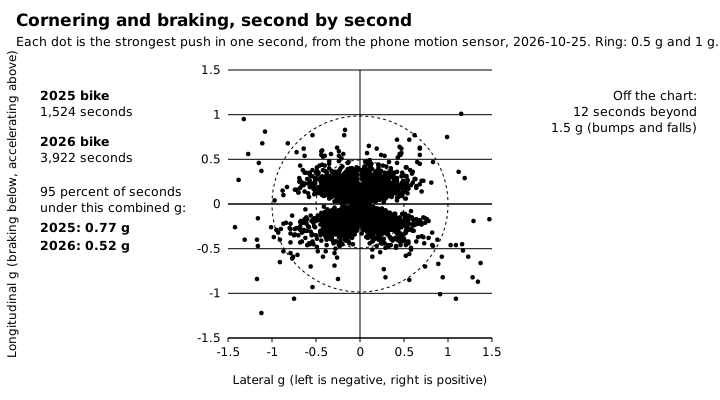
A g-g diagram from two trail rides: most seconds stay inside 0.5 g, with a few hard braking and cornering seconds near 1 g. The phones were mounted differently, which shows in the spread.
How lean is worked out
You do not have to mount the phone in a particular way for lean to work, because the app works out which way is up, forward and left on the bike from riding rather than from how the phone sits. For reading it at a glance, portrait on the bars is still best; see the mount.
- Up is learned from gravity, averaged over a couple of seconds of riding straight at 7 mph or more, not from the phone at rest, because a parked bike leans on its side stand. It keeps adjusting. A hill is ignored. If you move the phone, the app notices the change, holds steady for 20 seconds of straight riding, and learns again. “Recalibrate lean” is in the long-press menu of the Lean tile.
- Forward is the direction the phone accelerates while GPS says the bike is speeding up or slowing down. Samples taken in a corner are left out, so the sideways pull of a sweeper cannot skew it.
- Left follows from those two.
The accelerometer alone cannot see lean in a corner. In a balanced corner, gravity and the sideways push of the turn add up to a force that points straight down the bike, so the phone feels nothing out of the ordinary. So the gyroscope does the work: it measures how fast the bike rolls, and adding that up gives lean. Adding up drifts, so it is corrected against the lean a bike needs to hold a turn at your speed:
tan(lean) = speed x yaw rate / g
Speed comes from GPS, yaw rate (how fast you are turning) from the gyroscope, and g is gravity. As arithmetic only: at 20 mph (8.9 m/s) turning at half a radian a second, that comes to 24 degrees. The two readings are blended with a filter that trusts the gyroscope for 2 seconds at a time and the reference beyond that.
Cornering g is the same turn expressed as a sideways force, speed times yaw rate over g. Braking and acceleration g are the force along the bike, taken from the accelerometer in the bike’s forward direction.
Everything is filtered over 0.3 seconds, so vibration from a single-cylinder engine or a bump over a rock does not set a ride’s maximum. Lean is capped at 70 degrees.
If the phone’s left and right turn out to be swapped, the gyroscope shows it within the first corners and the app flips them, then remembers that for later rides.
What is shown and what is recorded
Live, the Lean tile shows lean with L or R, and the dashboard can show the ride’s maximum lean each side, maximum cornering g and braking g. Nothing shows until the app has learned both axes, and lean is blank when there has been no GPS speed for a moment.
What is saved is one line for each second you are moving:
- The lowest and highest lean in that second, to a tenth of a degree, positive right.
- The cornering and along-the-bike g, to a hundredth.
Nothing is saved when you are stopped or have no GPS speed. Four hours of riding adds at most 1.5 MB.
The ride detail screen has a “Lean and g” section with your maximums and a lean band over time. The GPX export carries moto:lean, moto:latg and moto:longg on each point.
The barometer, for hill climbs
The phone’s barometer feels small changes in height far better than GPS does. While a ride records, the app reads it to count each hill climb on its own: the This climb tile shows the climb you are on, and the ride keeps every attempt. The altitude and total climb tiles still use GPS. Separately, the KTM’s engine computer broadcasts ambient air pressure that follows altitude closely; see its bike page.
What we do not use
- The compass, beyond heading. It only fills in direction when you are going slowly.
- The camera. Never. The microphone only for a voice note you choose to send, or the intercom if you turn on recording it.
Apple Watch
A watch app adds heart rate and energy to a ride. When a ride is open, the phone asks the watch to start a workout, and the watch sends heart rate every 5 seconds, kept with the ride. If there is no watch, the ride says so.
More on how everything fits together in How it works, and which iPhones to use in Phones.