
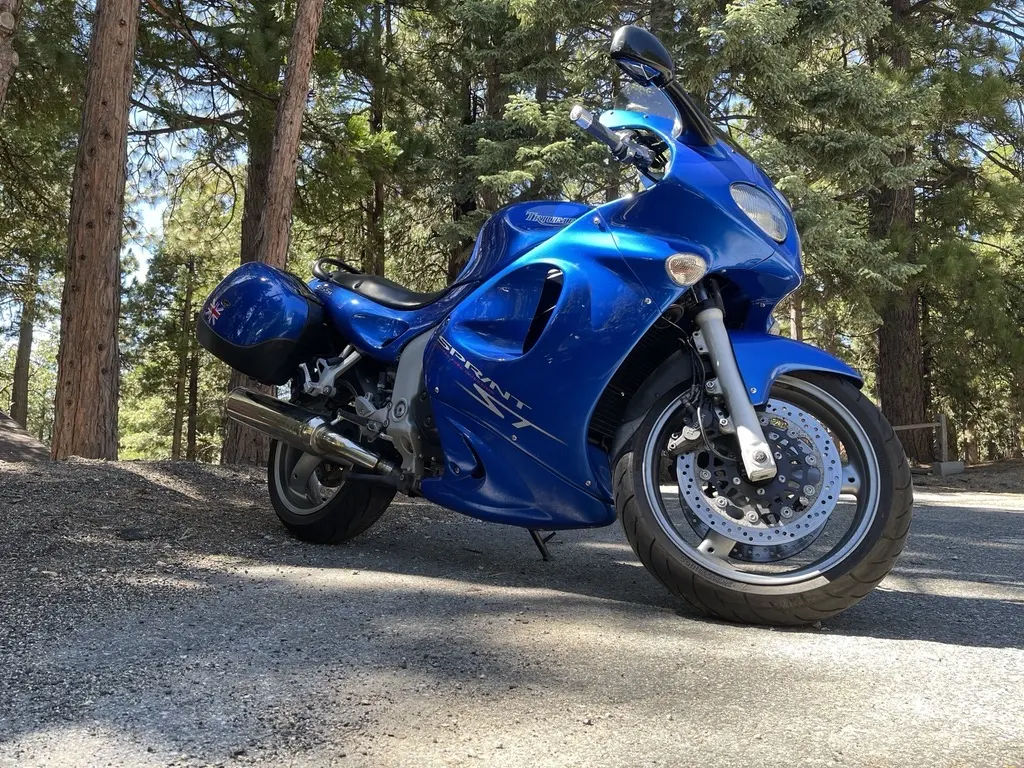
A 2004 Triumph Sprint ST 955i does not look like a data source. It has a fuel-injected triple, a Sagem engine computer and a sixteen-pin plug under the seat. It will talk to you, if you speak its language. This is what we learned.
The plug and the bus
The connector is the standard car shape, sixteen pins, under the seat near the battery. We measured 12.8 volts on pin 16 with the key on. The bike speaks K-line, a single-wire serial bus at 10,400 baud, which is how most cars and bikes of that age talked before CAN.
We have read it two ways: a USB data connector from a Mac, and a Bluetooth LE data connector from the phone app. Both work.
The slow init, and why fast init fails
Before a K-line bike talks, the tester has to wake it. There are two ways. Fast init sends a short pulse and is what most later K-line bikes use. Slow init is older and stranger: the tester sends the ECU’s address at five baud, one bit at a time, and then waits for the ECU to answer at the real speed.
The Sprint ST wants the slow one. We tried the fast version at four addresses and got a bus init error each time. With the slow init on the standard diagnostic setting, ISO 9141-2, the bike answered, and the first reply, the list of live values it supports, came back with a good checksum.
One quirk with the Bluetooth data connector: on this bike the first slow init always fails and the second one works. We saw that on four separate connections, so the data connector now retries once after a short pause, and you never notice.
What the standard channel gives you
The bike answers the standard modes for live data (01), stored codes (03), pending codes (07) and clearing codes (04). It does not answer mode 09, so there is no VIN. The app identifies the bike by its own ID instead.
It reports a dozen live values. The useful ones for a rider:
- Engine speed and throttle position, polled every cycle.
- Calculated engine load, coolant temperature and intake air temperature.
- Short-term and long-term fuel trim.
- Ignition timing advance.
- The oxygen sensor voltage, which swings as the engine runs in closed loop.
- Vehicle speed, as the bike reports it.
What you do not get on this channel is an injector value. The bike has a native diagnostic language on top of K-line, KWP2000, and the app uses the standard channel.
On the bike, the readings were right: the engine went into closed loop from 65 degrees Celsius and the oxygen sensor swung as it should. Charging voltage sat flat between 12.9 and 13.6 volts at idle, 3,000 and 4,400 rpm.
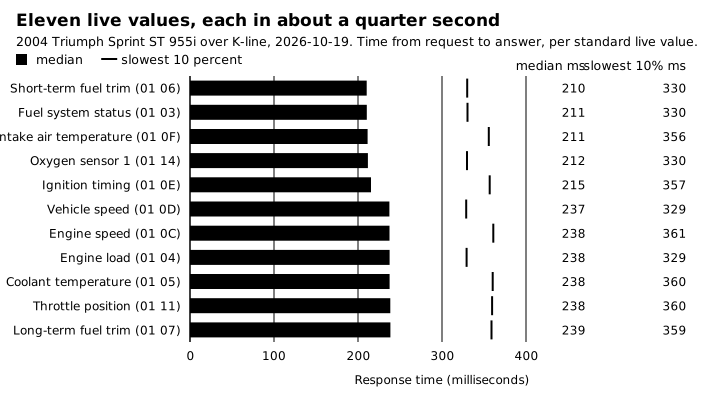
Each of 11 live values answers in 210 to 240 ms over K-line, so one pass through all 11 takes about 2.7 seconds.
Codes read, and cleared
The first time we plugged in, on September 20, the check-engine lamp was lit. The fuel tank had been off the bike, and we read five stored codes, covering the coolant and intake temperature circuits, the fuel pump relay and the fuel level sender. That is just what you would expect from a bike with its connectors unplugged and the key on. We cleared them, and they did not come back.
The bike does not flash its codes on the lamp.
When we came back on October 19, the lamp was off and there were no stored codes. Clearing a code does not fix the fault behind it, and the code comes back if the fault is still there. The phone app can clear codes on this bike, and only after you confirm.
The battery lesson
On October 19 the lithium battery went flat during the first start attempt, after 25 to 30 minutes of key-on. The data connector had been reporting the voltage the whole time: 12.8, then 12.7, then 12.5, then 12.3. Nobody was looking.
That is the lesson of a lithium battery. Its voltage barely moves until near the end, then falls fast. A bike that sits with the key on is slowly emptying it, and the first sign can be a dead start.
So we built a battery watch. Every time the data connector connects, and on each reading while it is open, it records the voltage along with what the bike was doing: resting, key on, running at a given rpm, or ending a ride. Over several rides it learns what normal looks like for that bike. When you ask for the battery status, it answers from that history: charge before riding, a steep drop under load, a cranking dip, or whether the charging system is reaching a healthy voltage.
The data connector measures at the diagnostic plug, a few tenths of a volt below the battery terminals, and the battery watch flags readings that look wrong from rules about voltage.
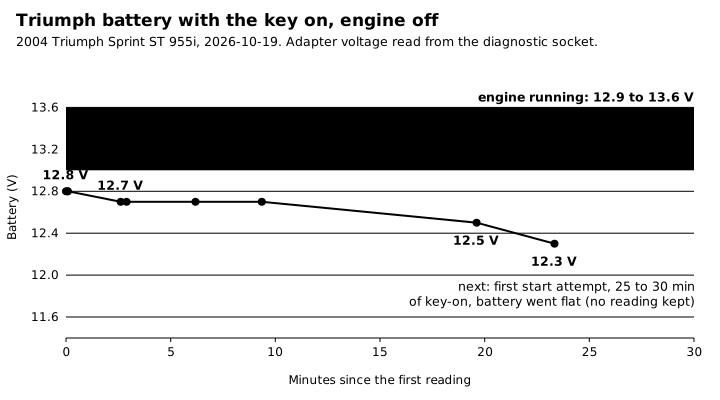
Key on, engine off: the Triumph’s battery fell from 12.8 to 12.3 V in 23 minutes. Running, it reads 12.9 to 13.6 V. This is why Life Lever Moto watches the battery.
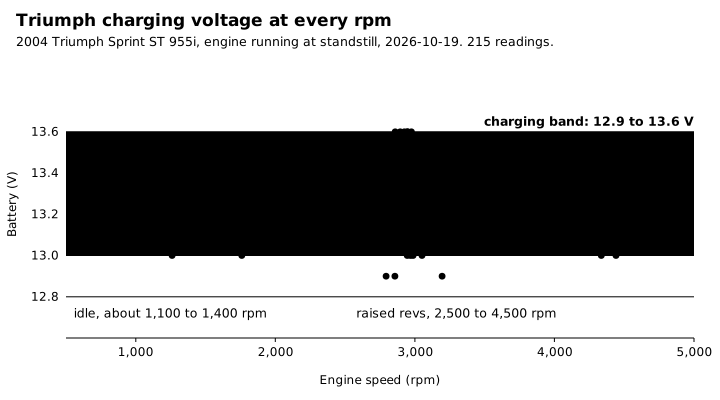
Charging voltage holds 12.9 to 13.6 V from idle to 4,500 rpm, with no trend: the charging system is healthy.
What goes into your record
Everything above lands in your ride record beside the GPS track: the live values, the codes read and the battery history. Your own assistant can then answer, for example, “what did the voltage do on the long ride last month?”
The full detail on this bike is at Triumph Sprint ST 955i, the table of bikes is at /moto/bikes, and the app is at /moto/app. For how it all fits, see /moto/how-it-works.
Life Lever Moto is an iPhone app and is not in the App Store, so it is handed out by invite.
KTM and Triumph are trademarks of their owners. lifelever is not affiliated with or endorsed by them.